Intro
In the last video I explained how I got my own AS number and my own IP addresses on the Internet, and it got a lot more attention than I expected. Thank you for all the comments, I read them.
A lot of you asked the same things: what BGP configuration looks like exactly, so here I'll explain that.
But before I do, I have to answer to one very important comment.
I have seen a lot of people, stupid people, that thought they could just open their own hosting, who managed to mess up a whole lot of things by doing „accidental“ mistakes using ebgp. Therefore I dislike the idea of people messing with stuff like that and decided to open their own isp. Sadly the internet is fragile and build on trust, a good place for stuff like this to happen.
And while I do not think you will do stupid stuff and maybe „know your shit“, people might think they can do this too. So yeah. Also not sure but I don’t think you have any advantage of being your own isp. In contrary, as you mentioned the cost of having your isp to agree to pear with you yeah is not low.
So why not just show in a good quality how all those network simulation tools work? It’s not only safer but also much more useful for learning this shit.
Comment by @GunniBusch1 under the previous video
And GunniBusch1 is right here - Internet is a really fragile thing built on trust. When Internet was created it was meant for academic use and army. No one thought about security back then... Today we have different ways of securing BGP, but there are still ways to break things. And unfortunately not all companies secure their BGP correctly..
One thing I don't agree with in that comment forces using "network simulation tools" to learn BGP. There is software like GNS3, Netlab and of course well-known Cisco Packet Tracer, but what teaches more than real mistakes? ;)
That said, there is something in between - it's called "dn42" - it is a peer-to-peer network built on tunnels (wireguard, gre, whatever) that works exactly like Internet. Uses BGP, provides IP addresses from private subnet 172.20.0.0/14 and there is whole Git repository for requesting AS numbers, IP addresses and all the things that you can find in the real Internet. They even have their own DNS system with their own domains that you can ask to reserve.
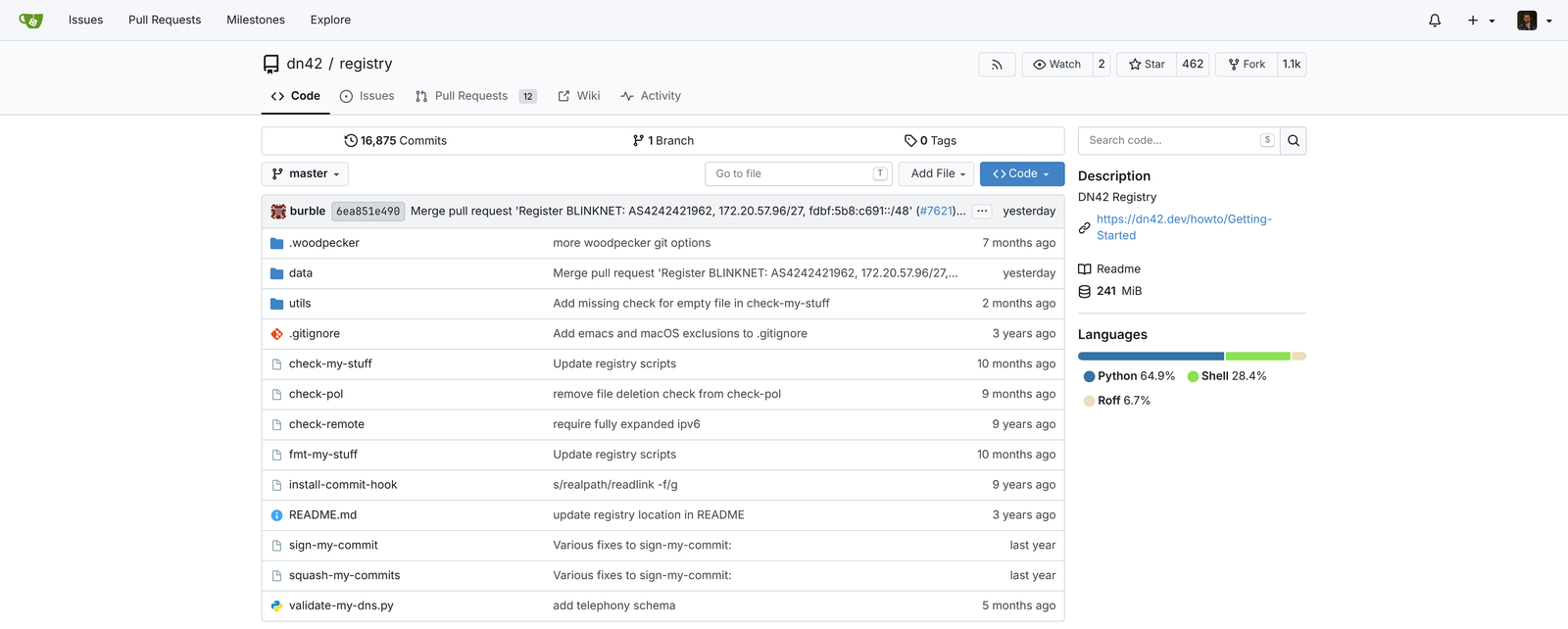
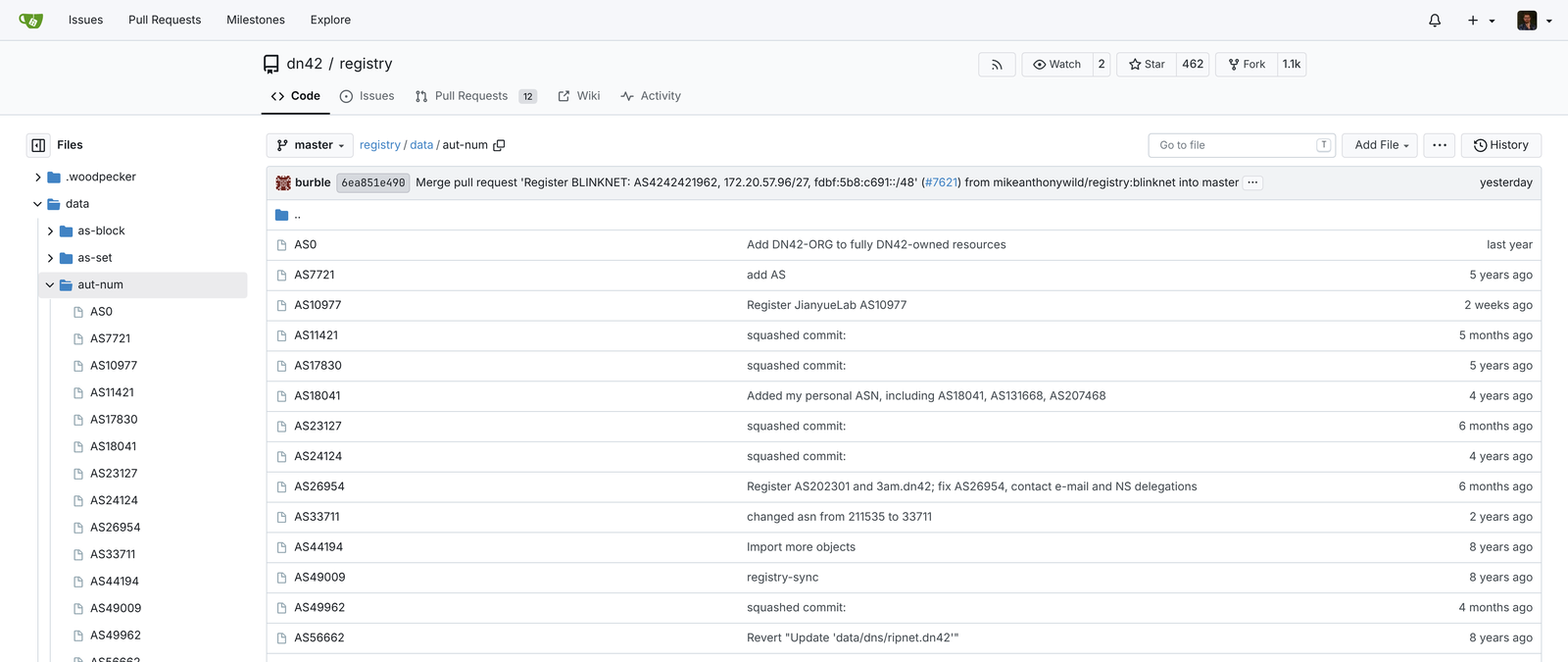
So in this video I'll show you what BGP is, what it exactly provides, how to configure it and explain how to make it secure.
1. What BGP is
I already talked about this in my last video, but let's quickly remind how the Internet works. It's a lot of separate networks connected together - your ISP, Google, Cloudflare, my small network at home - and each of them has its own AS number and its own blocks of IP addresses, which we call prefixes.
BGP is the protocol that allows networks to "announce" those prefixes to neighbour networks. You connect to other network either with physical fiber or tunnel and then establish BGP session with them in order to exchange routing tables.
This simply means that their network will know about yours (and your addresses), and your network will know about their addresses. And if you agreed with their network to get access to broad internet (called "transit traffic"), then you get full internet route table from them. It contains full list of all prefixes available from all networks worldwide.
Technically what that means is that they just forward you their best route for every prefix they already got from all networks they are connected to, after their own filters.
root@krk-rtr-1:~# birdc show route table t_dfz4 primary
BIRD 2.17.5 ready.
Table t_dfz4:
40.0.0.0/14          unicast [up_snet4 2026-10-28] * (100) [AS4249i]
        via 198.51.100.2 on up-snet
49.14.107.0/24       unicast [up_snet4 2026-10-29] * (100) [AS45271i]
        via 198.51.100.2 on up-snet
88.218.186.0/24      unicast [up_snet4 2026-10-28] * (100) [AS62240i]
        via 198.51.100.2 on up-snet
181.123.200.0/22     unicast [up_snet4 2026-10-30] * (100) [AS23201i]
        via 198.51.100.2 on up-snet
...

root@krk-rtr-1:~# birdc show route table t_dfz4 count
3225281 of 3225281 routes for 1079640 networks in table t_dfz4
This is also why it's good to have your own ASN - it allows you to connect to multiple networks and steer traffic as you wish instead of relying on someone else. This is called "multihoming" and this makes your addresses available through different paths and different upstream ISPs.
Aside from prefix list, BGP also provides few other information such: - AS path - list of all networks the route went through - next hop - address where traffic for those prefixes should be sent - origin - how the route got into BGP - MED - hint which link the neighbour prefers you to use - communities - tags that networks attach to routes
Whenever there is change in BGP routes, BGP sends message called UPDATE which container all that information and BGP speaker now can do something with that information. It can forward that route into iBGP - Internal BGP into other BGP speakers within my internal network, or simply attach those routes into kernel route table so my router actually starts routing packets onto proper networks...
root@krk-rtr-1:~# ip route show table dfz | head -3
1.0.0.0/24 via 198.51.100.2 dev up-snet proto bird src 91.221.159.254 metric 32
1.0.4.0/24 via 198.51.100.2 dev up-snet proto bird src 91.221.159.254 metric 32
1.0.5.0/24 via 198.51.100.2 dev up-snet proto bird src 91.221.159.254 metric 32

root@krk-rtr-1:~# ip -6 route show table dfz | head -3
2000:b70:25::/48 via 2a07:54c1:c000:ffff::c dev up-mathost proto bird src 2001:678:12b4::1 metric 32 pref medium
2001::/32 via 2001:db8::1 dev up-snet proto bird src 2001:678:12b4::1 metric 32 pref medium
2001:4:112::/48 via 2001:db8::1 dev up-snet proto bird src 2001:678:12b4::1 metric 32 pref medium
The big question is: what is in my UPDATE that I am sending to other peers. The answer is it depends. It depends on which upstream I am sending the update to because since the last video I actually got physical fiber connected to one of the Kraków's Internet providers and depending on the upstream I've set different parameters. For example, on routes that I receive from S-NET I am setting local preference of 400, which says that this is the most important link that I have, and routes from my GRE tunnels keep default local preference of 100. Higher value wins, so my router prefers S-NET over GRE. If S-NET fails, routes over GRE tunnels will take over traffic. Local preference stays inside my network though, as I am not sending it to upstreams.
There's only one caveat, though, because all of those settings are for my egress traffic, not ingress traffic. But if I want to steer traffic from Internet to me, that's technically not really possible, but we can inform other peers how We wish to traffic should be routed.
What I am doing is I am adding something called AS prepend. In the case of S-NET I am sending my AS number only once, but in the case of MTK and MatHost I am adding my AS once, twice or maybe even three times, depending on how I really want this to be de-preferred, so to speak.
How all of this works is that other networks, after their own local preference, look at the AS count. Let's say I'm downloading something from Google. Google sends me response packets, but it doesn't care through which link my request came - it looks at the AS paths it has to my network and picks the shortest one. Through S-NET it sees, let's say, Lumen, which is Tier 1, then S-NET, and then my network, so 3 hops. Through MatHost it sees Lumen, then MatHost, and then my AS 4 times because of my AS prepend, so 6 hops. So Google will usually choose path through S-NET. This is not counted by milliseconds or anything like that, only by AS count, but in most cases it's enough to steer the traffic.
But how do I verify that incoming traffic really comes through S-NET? I cannot call Google and say, oh guys, please tell me what the path to me looks like, that's not really possible. Fortunately RIPE has a tool for that called RIPE Atlas, and through RIPE Atlas you can run traceroute to your network, so you can verify the paths. How this works is that the community, all the ISPs and people who provide Internet services or just volunteers, can host RIPE Atlas probes, either small hardware probe or software probe installed on their servers, so you can check what are the paths to access your network from different places all around the world.
2. Software
If you want to use BGP, you need to configure software called BGP speaker. You can choose one of the many software available out there like BIRD, FRR, OpenBGPD or maybe even RouterOS from MikroTik, or you can just configure BGP on any physical router like Cisco, Juniper and others. But whatever you choose, it will still be compatible with normal BGP, it will have all the parameters that I'm explaining here, only the syntax and the way of configuring things may differ, because BIRD, for example, has nice configuration files, but on Cisco or Juniper or VyOS may need to be configured using CLI.
Since I am using BIRD, I will be showing you my setup using its configuration.
3. My setup
My current setup is two GRE tunnels that I have established to MatHost and MTK and one physical fiber to the S-NET in Kraków. Because I have separate BGP sessions for IPv4 and IPv6 individually, that means I have 6 sessions in total, and through all of those sessions I am getting full routing table of the whole planet, which means that I can steer the traffic however I want through each upstream. There is also multiprotocol BGP called MP-BGP, which can carry IPv4 and IPv6 through one session, along with other protocols.
S-NET is a normal fiber connected straight into my router - it's direct connection to their closest Data Center here in Kraków. The only difference is that it has only 1 strand, while regular SFP modules that you see in typical datacenter installation are 2 strands.
If you're interested how much such real direct fiber costs, what is Internet Exchange and how all the prices go along, hit subscribe for more videos about how Internet Really works!
MTK and MatHost are different, because they are far away from my home, so I'm reaching them through GRE tunnels over my Orange fiber. Some of you asked about GRE in the comments, so very shortly let's explain how it works.
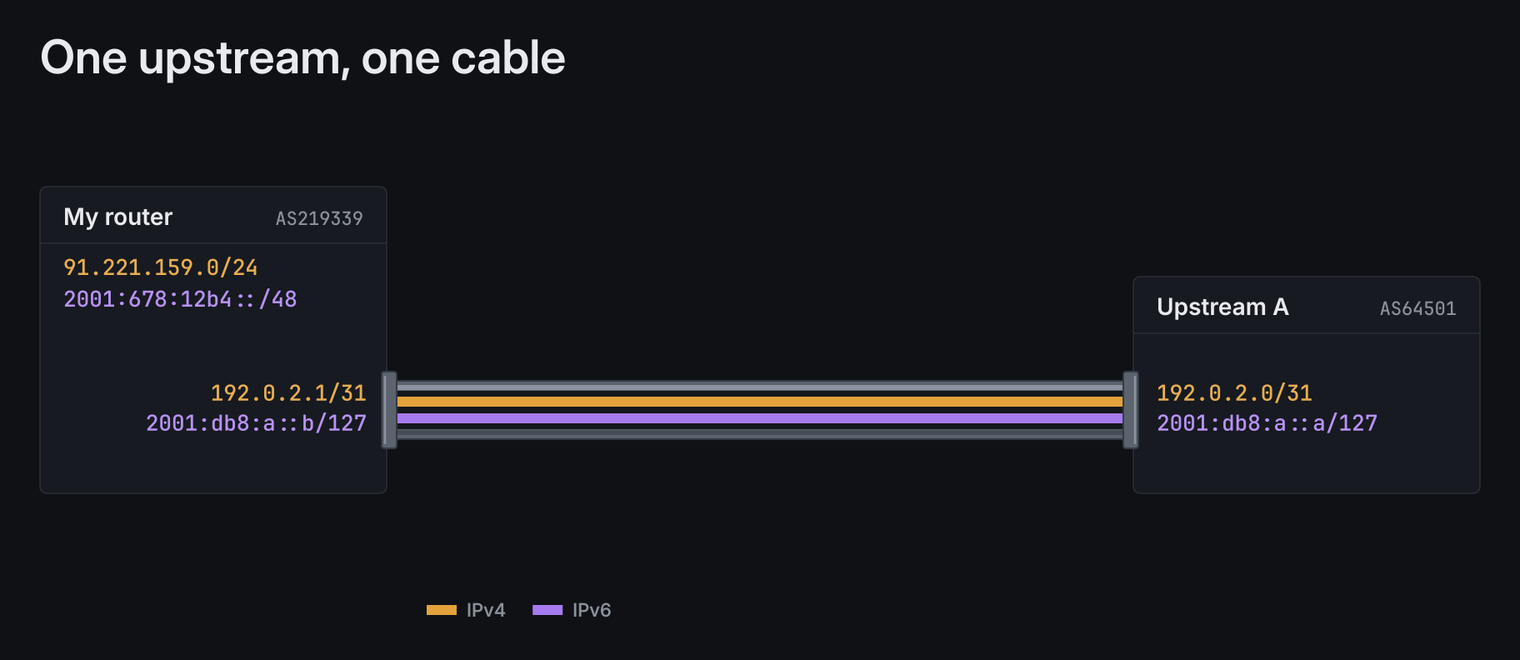
GRE tunnel takes every packet and puts it inside another packet - this is called "encapsulation", which is addressed from my home IP to the other end of the tunnel. My ISP and everything in between see only this outer packet. For BGP it doesn't matter at all - tunnel is just like a virtual cable for it - with 2 ends - me and remote peer. The downside is that this additional header takes 24 bytes from every packet, so instead of usual 1500 bytes I can fit only 1476 bytes through the tunnel.
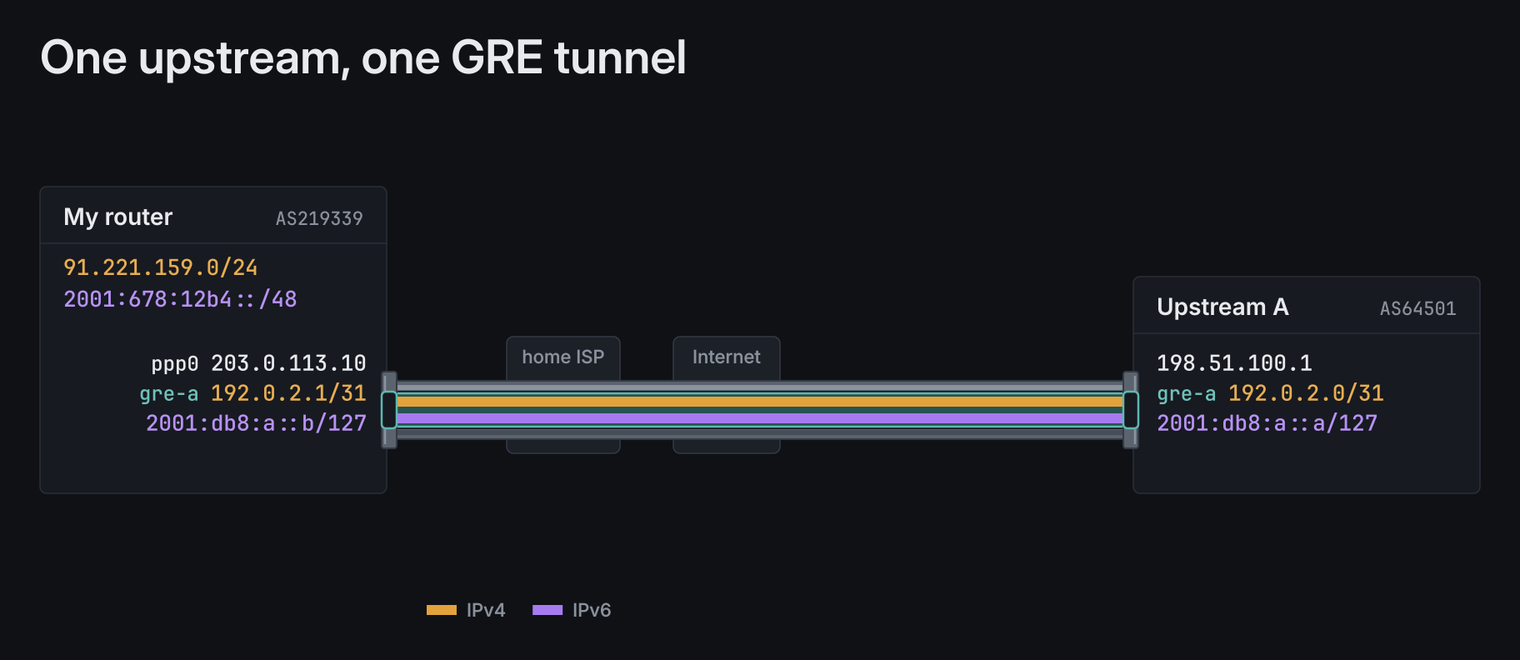
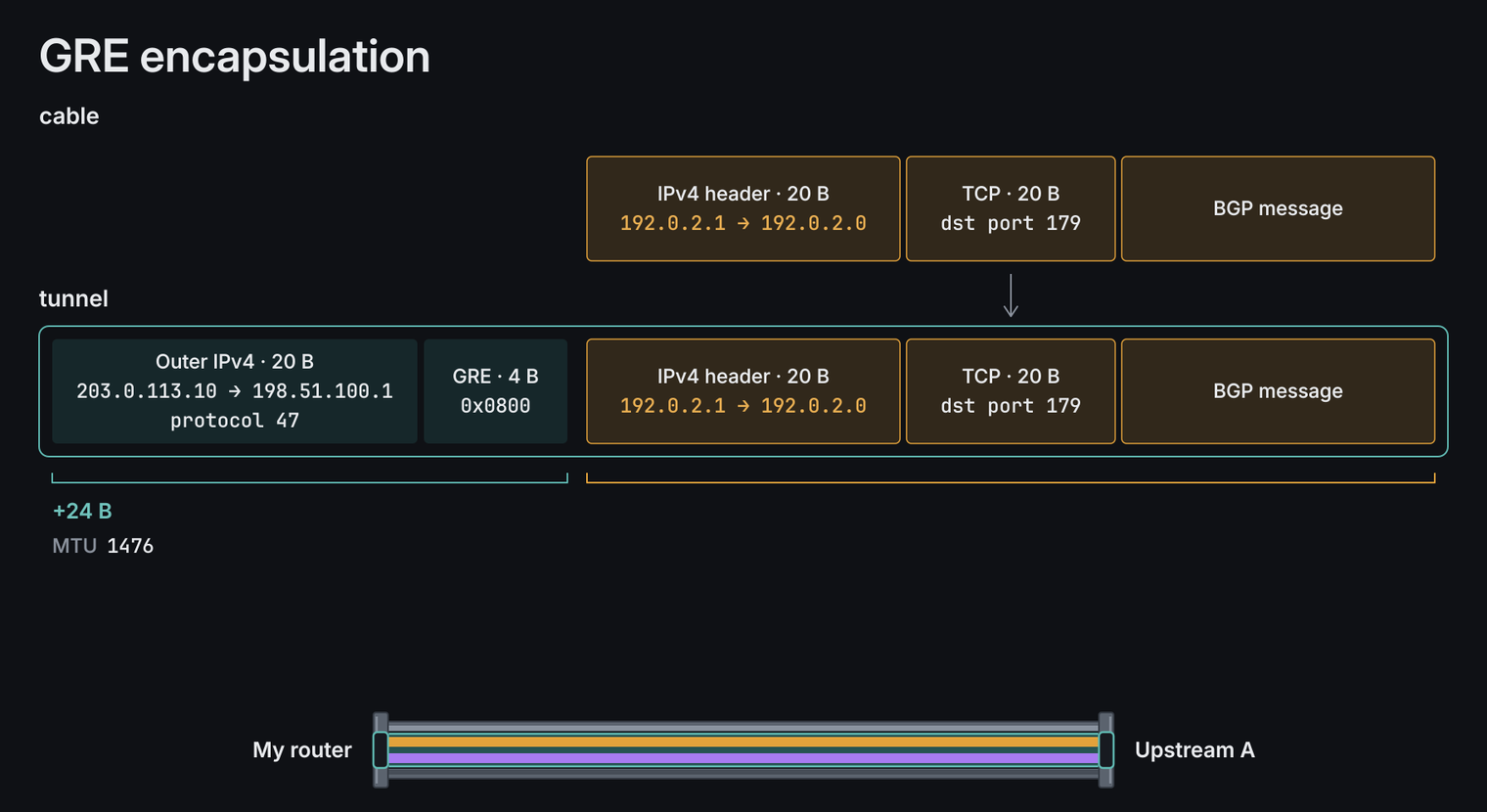
Another problem here is that GRE is unencrypted, so while technically ISP sees "GRE packet going through their network", there is no problem for them decoupling those packets and see BGP, HTTP or DNS traffic that I have flowing there. Since this is Internet traffic, I don't really care that much about it, but if you want that traffic fully encrypted, you can always use Wireguard, IPSec or whatever else that supports encryption. It doesn't matter until it provides that "virtual cable"-like result.
Now, let's go back to the BIRD.
In BIRD you can see state of all sessions with show protocols:
root@krk-rtr-1:~# birdc show protocols
Name        Proto  Table  State  Since                Info
up_snet4    BGP    ---    up     2026-10-27 13:22:18  Established
up_mtk4     BGP    ---    up     2026-10-27 01:14:10  Established
up_mathost4 BGP    ---    up     2026-10-30 20:40:22  Established
up_snet6    BGP    ---    up     2026-10-27 13:22:18  Established
up_mtk6     BGP    ---    up     2026-10-27 01:13:59  Established
up_mathost6 BGP    ---    up     2026-10-30 20:41:22  Established
"Established" means session is up and routes are flowing. But there might be also "Active" there, which simply means that BGP is enabled on my side, but it's not yet Established with the other end, as the other end might not yet configured it, or there is another problem.
When you look into details of one those sessions, you can also see how many routes we're importing from that remote peer, and how many routes we're exporting to it:
root@krk-rtr-1:~# birdc show protocols all up_snet4
  ...
  Routes:         1072519 imported, 1 exported, 1072519 preferred
As you see, I've got about million IPv4 prefixes imported from them, and 1 exported from me to them.
So what's a "prefix"?
Prefix is simply a block of IP addresses, written as first address and its length after the slash. For example my 91.221.159.0/24 means that first 24 bits are always the same, and only last 8 bits can change, so it's all addresses from 91.221.159.0 to 91.221.159.255, which is 256 addresses in total. The smaller the number after the slash, the bigger the block - /23 is 512 addresses, /16 is 65536.
So million prefixes means a million blocks of addresses, where each of them can be a different size.
Also, if someone owns /23 (512 addresses), he can choose to announce 2 separate /24 networks. That might be used for multi-location purposes for example: announce different addresses in EU than in US.
There is also "preferred" routes count, which says how many of those routes won as the best route on my router. For S-NET it's all of them, because of local preference 400, and for MTK or MatHost it's only few thousands.
4. My config
Before we even open BGP speaker config, we need few things first:
- your AS number - mine is 219339
- your prefixes - 91.221.159.0/24 and 2001:678:12b4::/48
- upstream's AS number - for S-NET it's 42927
- upstream's IP addresses for the session - for example 198.51.100.2 and 2001:db8::1
- your own IP addresses for the session - for example 198.51.100.3 and 2001:db8::2
- optionally MD5 password, if upstream wants it - S-NET doesn't
AS number and prefixes you get from RIR, as I showed in the last video. Everything about the session itself - peer AS, perr IP and your IP - you get from your upstream.
And before upstream accepts your prefix, it will usually check in RIPE database that it really belongs to you, so you need route object there for each prefix. And also ROA, which I'll explain later in RPKI part.
Let's take a look how one session is configured. Every session looks almost the same, so here is the one for S-NET over IPv4:
protocol bgp up_snet4 {
    description "AS42927 S-NET IPv4";
    local 198.51.100.3 as 219339;   # example IP from point-to-point /31
    neighbor 198.51.100.2 as 42927; # example IP from point-to-point /31
    direct;
    hold time 15;
    keepalive time 5;
    bfd on;
    graceful restart off;
    enforce first as on;
    ipv4 {
        table t_dfz4;
        import filter import_v4;
        export filter export_v4;
        import limit 2000000 action disable;
        import table on;
    };
}
Endpoint IPs are not exactly public, so I censored them with RFC 5737 example IPs. All the other things are either public, or my configuration.
In this configuration, you can see that I am using the protocol BGP. There are multiple different protocols that BIRD supports, like OSPF or Babel, which we are not talking about in this video. There is a simple description, and there are local and neighbor IPs. So, local IP is the IP I was given by my upstream to me, and neighbor is the upstream's IP. This is a /31 IP assignment called point-to-point, so we can only peer with each other, and I don't see any other IPs within their network. I also have that local IP configured on my local network interface that is connected to the end in the direct fiber connection.
Then there is the direct information that simply specifies that this is a direct BGP connection. There are also hold time and keepalive time options specifying how fast BGP should discover that it is disconnected. This is standard behavior, although there is also a BFD option which allows for much faster detection of the broken link. There are two different ways you can configure your link with the remote peer. One is connecting directly to the router that you have, and in that case, the BIRD or whatever other BGP software you're using will automatically detect the interface if it has a working cable or not. But in my case, because in front of the router I have a switch, that won't be possible to detect because on my router, the link is always up because it's connected to the switch.
So if I disconnect the fiber from the switch, the BIRD will be unaware. In that scenario, you can use BFD to pass packets to the end of that fiber to the end of that BGP connection, and it will automatically detect problems much faster - in my case in 1 to 3 seconds. The caveat is that the other side also has to enable BFD on their side, so I had to write an email. "Hey guys, please enable me BFD because I am behind a switch."
There are also things regarding IPv4 and IPv6. Since this is an IPv4 example, there is just information about what I will be importing, what I will be exporting, and what are the limits. You can see I have import filters that simply specify that if there is something wrong going on and coming from their network, I will be filtering those out. For example, any announcements that are smaller than /24, I am trimming off. If they send me any IP address inside an update packet that is local area network addresses, I will discard those also because this is a mistake; they shouldn't do that.
For the same purpose, I also have filters on exports, so if I make any mistake, I won't be exporting those internal IP addresses either to them. They will be happy, and they won't call me in the night that I'm doing something nasty. There is also an import limit which simply specifies how many prefixes we are supporting from that provider. This is mostly for security purposes. If their end declares that they will be giving me the full routing table worldwide, then I should set this limit to whatever number of routes are worldwide, which is more than a million. I've set this to two million currently, but if I am agreeing with someone that they will just send me one or two prefixes, then I will just set limits to like ten.
If that someone accidentally sends me a hundred or ten thousand different prefixes, that means something went very wrong, and my end would drop that BGP connection and would disconnect from that end because there is something invalid going on. Then I will call that other party and tell them, "Hey, you screwed up. You shouldn't configure it like that, or you should inform me that I need to raise that limit; otherwise, they will have an unworking connection with me."
Export
Let's start with export, because that's what other networks see from me.
To announce my prefix, BIRD has to have route for it first. So I have static route for whole prefix which goes nowhere - in BIRD it's called blackhole. This might not be exactly intuitive at first sight, but this syntax allows me not to tie this routing with any interface or IP.
It's there only so BGP has something to announce, and real addresses I'm using have their own, more specific routes, so traffic still gets to them.
protocol static static_v4 {
    ipv4 { table t_dfz4; };
    route 91.221.159.0/24 blackhole;
}
And export filter itself is very simple - if it's my prefix, accept it, everything else reject (I'm skipping blackholing part here, that's topic for another video):
filter export_v4 {
    if net = 91.221.159.0/24 then accept;
    reject;
}
For MTK and MatHost it's the same filter, but with AS prepend I talked about before. In case of MatHost I'm adding my AS three times, because MatHost bills me over 100 Mbit, so I really want it to be the last choice for incoming traffic:
filter export_v4_mathost {
    bgp_path.prepend(219339);
    bgp_path.prepend(219339);
    bgp_path.prepend(219339);
    if net = 91.221.159.0/24 then accept;
    reject;
}
After that you can check on bgp.tools, bgp.he.net or RIPEstat if your prefix is really visible on the Internet and through which upstreams.
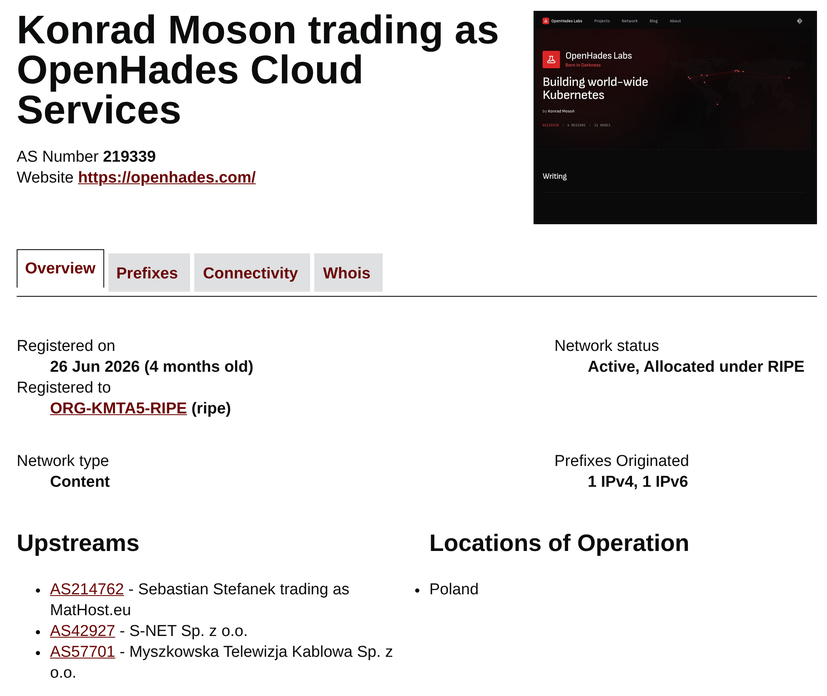
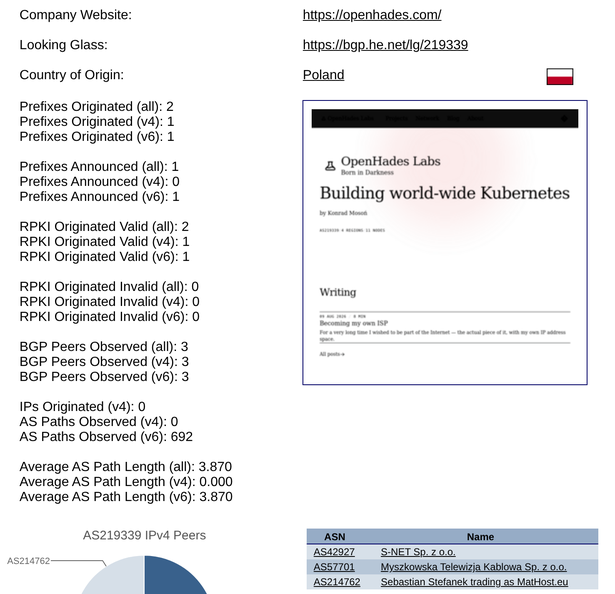
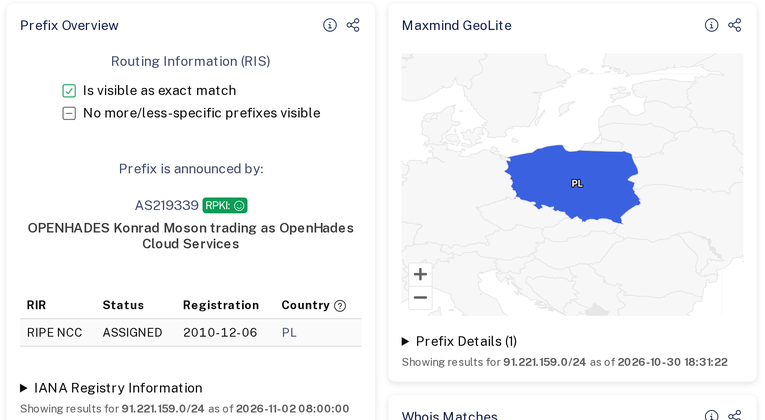
Now what would happen if I just wrote export all instead?
My upstreams are my providers - I'm paying them, so I'm their customer. And providers prefer routes from their customers over other routes, because customers are the ones who pay them :)
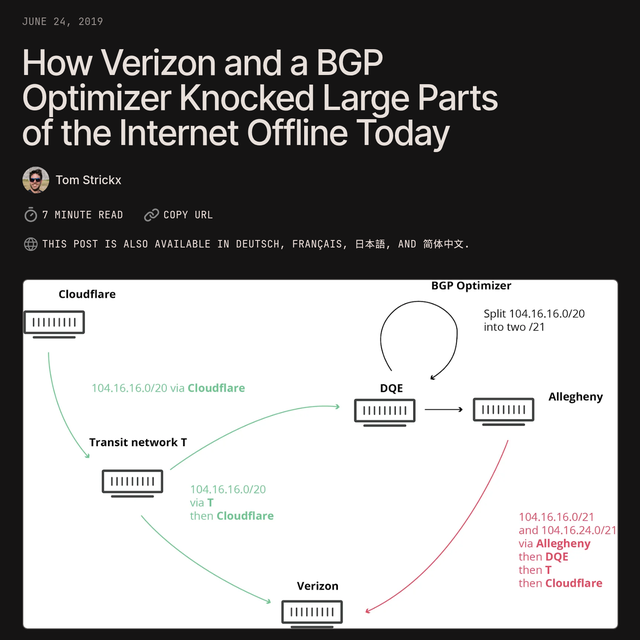
So with export all my router would send full table I got from S-NET to MTK and MatHost. They would think those are routes from their customer, they would prefer them, and suddenly traffic for half of the Internet would go through my router at home. This is called route leak.
Of course, they have security measures in place and they also have such import filters, so that's not gonna happen, as their filter allows only for my prefixes to be accepted... but you get idea how this can break everything when peers don't know what they are doing.
And this happened in real life. In June 2019 small company in USA did similar mistake, their provider Verizon accepted those routes, and big part of Internet traffic, including Cloudflare's, went through that small network for few hours. I'll put link to the whole story in the description.
Import
Import is the opposite - what I accept from my upstreams. This filter is longer, so I'll show only the most important parts:
filter import_v4 {
    if net = 91.221.159.0/24 then reject;

    if roa_check(r4) = ROA_INVALID then reject;
    if bgp_path ~ BOGON_ASNS then reject;
    if bgp_path.len > 100 then reject;

    if net = 0.0.0.0/0 then reject;

    if net ~ [ 10.0.0.0/8+, 172.16.0.0/12+, 192.168.0.0/16+, ... ] then reject;

    if net.len < 8 then reject;
    if net.len > 24 then reject;

    if bgp_path.first = 42927 then bgp_local_pref = 400;   # S-NET
    ...
    accept;
}
First line rejects my own prefix, because I don't need anybody to tell me how to get to my own network - I already have that defined in my static routing.
Then there is RPKI check, which I'll explain in a moment, and two checks of AS path - if there is AS number that shouldn't exist on the Internet, or if path is longer than 100 networks, which never happens in normal situation.
Then there are bogons - addresses that should never appear on the Internet, like private ranges 10.0.0.0/8 or 192.168.0.0/16. And too small prefixes - /25 is perfectly fine for BGP, but everyone filters anything smaller than /24 on IPv4 and /48 on IPv6, so routers don't have to keep millions of tiny routes.
Quick question for you: if somebody would send me 192.168.10.0/24 and 8.8.8.0/25, which one would get through?
None of them. First one is private range, so it's a bogon, and second one is smaller than /24.
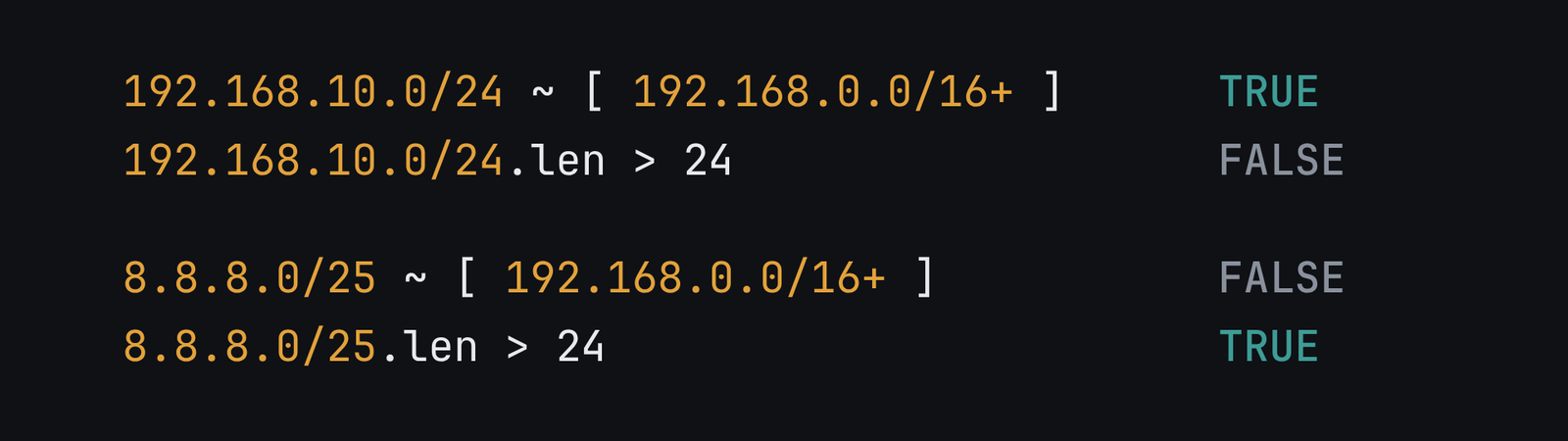
The second one might be valid, if I were to announce 8.8.8.0/24 and I was giving my customer smaller part of that address range. So internet knows how to reach the /24 that I own, and then I'm routing that traffic to the customer. But this defeats the purpose of having BGP, as it won't support multihoming due to needing at least /24 prefix.
There is also one line that I added after it broke my network - rejecting default route 0.0.0.0/0. When I enabled IPv4 on one of my upstreams, my internal network suddenly stopped working. It turned out that this upstream sends also default route, and others never did. My filter accepted it, and traffic that should stay inside my network went out through the tunnel. While in normal situation that's not wrong - and you can even ask your BGP upstream to send you just default route instead of full route table - in my configuration it broke my network, because that default route started catching traffic which should never go to the tunnel. I'll show that table in the Kernel part.
At the end there is local preference. Since S-NET is physical link, it gets 400, so it always wins any outgoing traffic. Between MTK and MatHost I've measured latency to services I use the most, like Cloudflare, GitHub or Docker Hub, and for each of them I've hardcoded higher local preference on the upstream that was faster in terms of latency. But those matter only when S-NET is down.
Limit
One more line in the channel is import limit. If neighbour suddenly sends me much more routes than he should, for example because he made a mistake on his side, BIRD shuts down the session instead of accepting all of them.
This works both ways, and other side also has such limits.
As you saw, each session gives me about 1.07 million IPv4 routes and about 250 thousand IPv6 routes. I have limit set to 2 million for IPv4 and 500 thousand for IPv6, so roughly twice the full table, which gives me some space for growth of the Internet.
root@krk-rtr-1:~# birdc show protocols all up_snet4
  ...
    Import limit:   2000000
      Action:       disable
    Routes:         1072069 imported, 1 exported, 1072069 preferred
Kernel
When BGP is configured in bird, route table is stored only in BIRD's memory.
In order to actually install them onto Linux kernel route table and have packets properly forwarded between network interfaces, we need protocol kernel in config. It copies best routes into Linux routing table.
protocol kernel kernel4_dfz {
    kernel table 100;
    ipv4 {
        table t_dfz4;
        import none;
        export all;
    };
}
I'm using separate kernel table called dfz for full table, so when I run ip route show I don't see millions of entries (which takes few seconds by the way), but instead just default route table with standard local network entries.
If I want to see routes from BGP, I need to run ip route show table dfz. Which by the way needs definition in iproute2 config files in order to be called by name in the first place...
root@krk-rtr-1:~# cat /etc/iproute2/rt_tables.d/dfz.conf
100     dfz
But keep in mind - think about routing table like a map. Linux can have many maps, but by default it looks only at one called main. If BGP routes are on another map, Linux will never look at it by itself, so you have to tell it when to use it. That's what ip rule is for - it's simply a rule like "packets from those addresses should use dfz map". Without it BIRD will show you million routes, but packets will completely ignore them. In my case it looks like this:
root@krk-rtr-1:~# ip rule
...
32750:  from 91.221.159.0/24 lookup dfz
32760:  from 192.168.1.0/24 lookup dfz
32766:  from all lookup main
32800:  from all lookup dfz
So traffic from my own addresses and from my home network goes through BGP routes, and everything else goes through main first.
If you're just starting, simply don't set kernel table in BIRD so it configures routes directly in main table and you don't get all that complexity. But if your upstream is behind a tunnel, keep a route to the tunnel endpoint through your normal ISP, otherwise tunnel will try to go through itself.
5. RPKI
Filters I showed you check only if route looks okay. But they can't check if network that announces some prefix is really its owner. Since I'm accepting whole Internet from my upstreams, if someone somewhere announced Google's addresses and my upstream passed that to me, my filters would happily accept it. And that's what RPKI is for.
With RPKI owner of addresses publishes signed record called ROA, which basically says "this prefix can be announced only by this AS". My ROAs were created by my sponsoring LIR, as I'm not LIR myself.
But publishing ROAs protects only my addresses. When I checked my network on isbgpsafeyet.com, it still said my network is not safe, because my router wasn't checking ROAs of other networks.
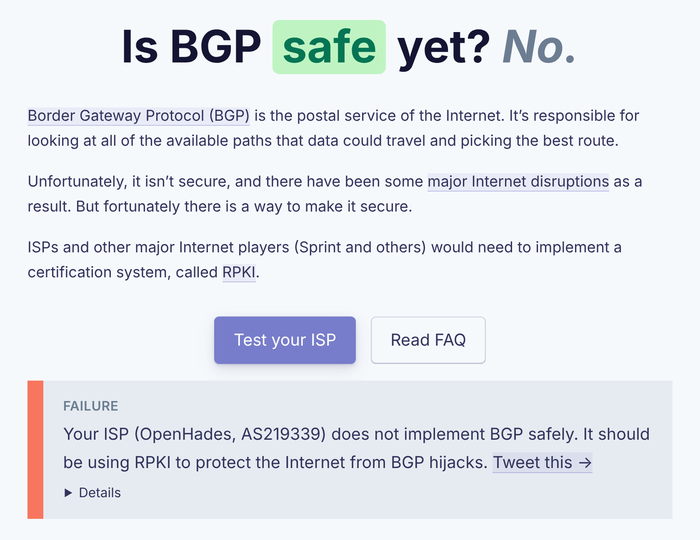
To do that, you need validator - program that downloads all ROAs from the whole world and gives them to BIRD. I've used funny-named Routinator that I ran on my Raspberry Pi:
protocol rpki rpki_krk {
    roa4 { table r4; };
    roa6 { table r6; };
    remote 10.19.11.215 port 3323;
    expire keep 172800;
}
And then it's just one line in import filter I showed before:
if roa_check(r4) = ROA_INVALID then reject;
Every route gets one of three results: Valid, Invalid, or NotFound when no one created ROA for it. I'm dropping only Invalid, because a lot of the Internet still doesn't have ROAs at all.
And this is not only theory. Every one of my upstreams still sends me some Invalid routes, and my router just drops them. Most of them are not real attacks, just someone's mistake in configuration, but I still don't want them in my table:
root@krk-rtr-1:~# birdc "show route import table up_snet4.ipv4 where roa_check(r4, net, bgp_path.last) = ROA_INVALID count"
289 of 1073029 routes for 1073029 networks in table import
root@krk-rtr-1:~# birdc "show route import table up_mtk4.ipv4 where roa_check(r4, net, bgp_path.last) = ROA_INVALID count"
161 of 1076702 routes for 1076702 networks in table import
root@krk-rtr-1:~# birdc "show route import table up_mathost4.ipv4 where roa_check(r4, net, bgp_path.last) = ROA_INVALID count"
217 of 1077583 routes for 1077583 networks in table import
root@krk-rtr-1:~# birdc "show route import table up_snet6.ipv6 where roa_check(r6, net, bgp_path.last) = ROA_INVALID count"
6 of 246566 routes for 246566 networks in table import
root@krk-rtr-1:~# birdc "show route import table up_mtk6.ipv6 where roa_check(r6, net, bgp_path.last) = ROA_INVALID count"
5 of 247371 routes for 247371 networks in table import
root@krk-rtr-1:~# birdc "show route import table up_mathost6.ipv6 where roa_check(r6, net, bgp_path.last) = ROA_INVALID count"
146 of 255722 routes for 255722 networks in table import
You can also check it by hand:
root@krk-rtr-1:~# birdc "eval roa_check(r4, 91.221.159.0/24, 219339)"
(enum 34)1
root@krk-rtr-1:~# birdc "eval roa_check(r4, 91.221.159.0/25, 219339)"
(enum 34)2
root@krk-rtr-1:~# birdc "eval roa_check(r4, 8.8.8.0/24, 64500)"
(enum 34)2
1 is Valid and 2 is Invalid. My /24 is Valid, but /25 from my own AS is Invalid, because my ROA allows only /24. And Google's 8.8.8.0/24 from some random AS is also Invalid, so my router would drop it.
And what if Raspberry Pi dies? BIRD keeps the ROAs for 2 days (that's expire keep line), and after that it just accepts everything like there was no RPKI at all. Better that than losing whole Internet. And if I would have more routers in my network (maybe even worldwide), all of them can connect to that one tiny Raspberry Pi with it's ROA database.
RPKI doesn't protect from everything though. It checks only who announces the prefix, not the path, so it won't stop route leak, and someone can still fake it by putting Google's AS at the end of his path. For leaks you still need export filter.
6. When upstream dies
As I mentioned before, BGP by itself finds out that neighbour is dead only by keepalives. My router sends keepalive every 5 seconds, and if it doesn't hear anything back for 15 seconds, it closes the session - this is called hold time. BIRD's default is 240 seconds, so 4 minutes of sending traffic into dead link before router even notices, which is way too long for me.
And interface state doesn't help much here. GRE tunnel interface is up all the time, even if there's nothing on the other side, and S-NET is behind a switch, so link on my router also stays up. That's why I'm running BFD on all upstreams:
protocol bfd bfd1 {
    interface "up-*" {
        interval 300 ms;
        multiplier 3;
    };
}
root@krk-rtr-1:~# birdc show bfd sessions
IP address       Interface   State  Since                Interval  Timeout
192.0.2.1        up-mtk      Up     2026-10-27 01:13:10  0.300     0.900
203.0.113.1      up-mathost  Up     2026-10-30 20:39:24  0.300     1.500
198.51.100.2     up-snet     Up     2026-10-28 11:05:04  1.000     3.000
My config says 300 ms and 3 missed packets, but both sides have to agree on interval and the slower one wins, and timeout uses multiplier from the other side. So S-NET is 1 second times 3, so 3 seconds, MatHost uses 300 ms but multiplier 5, so 1.5 second, and MTK is 0.9 second. Still a lot faster than 15 seconds of hold time.
When I enabled BFD first time, it was Down on both sides and I had no idea why. It turned out my firewall was dropping its packets - BFD is using UDP port 3784 - so if you have the same problem, check your firewall first.
Quick question: what happens with traffic coming from the Internet when S-NET dies?
My router notices it in about 3 seconds and switches outgoing traffic to MTK and MatHost. Incoming traffic takes longer, because the whole Internet has to learn that path through S-NET is gone, and that can take up to few minutes.
Conclusion
That's my whole BGP setup for the Internet. On my router there is slightly more - session to bgp.tools route collector and BGP sessions with my Kubernetes cluster, which announces service IPs automatically - but everything that connects me to the Internet is here. And it's not that much config in the end - most of it is just filters, so I don't accept or send something I shouldn't.
If you want to play with it safely, dn42 is great place to start. Next video will be about anycast or my IPv4 purchase, so let me know in the comments which one you want first.